
GHOST / DOCUMENTATION
Get Ghost running
in your project.
Install Ghost, review your source, and test a supported change. Commands, evidence, and terminal walkthroughs for your own repository.
Default scans need no API key. Findings and reviews stay in your project’s .ghost/ directory. Optional LLM assistance shares the context or source you select with your configured provider.
One installation. Your own Git projects.
02 / REVIEWFind the leadsScope, scan, and read the evidence.
03 / CHANGETest a proposalInspect the diff before applying.
cd ~/projects/my-app
ghost doctor
ghost find
ghost brief01 / SET UP YOUR SYSTEM
Install Ghost.
You need Git, Python 3.12 or newer, and macOS sandbox-exec or Linux Bubblewrap for isolated scans and experiments. Installation downloads dependencies; default static scans run offline afterward. These commands install the development version from main.
With uv — macOS or Linux
Already have uv and Git? Install Ghost as a user tool, then open a new terminal if PATH was updated.
uv tool install --python 3.12 "git+https://github.com/Devesh36/ghost.git@main"
uv tool update-shell
On Ubuntu/Debian, install the required sandbox first. On other Linux distributions, use your package manager’s Bubblewrap package.
sudo apt install bubblewrapWith Homebrew
Homebrew installs Ghost and its required dependencies in a dedicated environment. On older Intel Macs, dependency builds can take time; the uv option can be more convenient.
brew tap devesh36/ghost https://github.com/Devesh36/ghost.git && brew install --HEAD devesh36/ghost/ghostCheck your installation
ghost --helpWindows users can try a Linux environment such as WSL2; native Windows execution is unsupported. Run ghost doctor inside your repository to check storage, tools, and confinement before experiments.
02 / CHOOSE A REPOSITORY
Your project is the context.
You do not need to copy Ghost’s source into your application. Run it from the Git repository you want to review. Switch repositories by changing directories; each project keeps its own local history.
cd ~/projects/my-app
git rev-parse --show-toplevel
git rev-parse --verify HEAD
ghost doctor
ghost scope
The repository needs an initial commit. If it is a new project, create one using your normal Git workflow before running Ghost. Add .ghost/ to that project’s .gitignore; it contains local reviews, provider settings, and experiment data.
Python project tests: use the same environment
A global Ghost installation cannot automatically see your project’s Python dependencies. For Python repairs, install Ghost into the environment that already contains your project and test dependencies.
uv pip install --python .venv/bin/python "git+https://github.com/Devesh36/ghost.git@main"
.venv/bin/ghost doctor
.venv/bin/ghost fix "your requested change" --path app/parser.py --tests "python -m pytest -q" --llm
This assumes .venv already exists and contains your project’s dependencies and pytest. Ghost pins Python test execution to its own interpreter.
03 / FIND & UNDERSTAND
Run your first review.
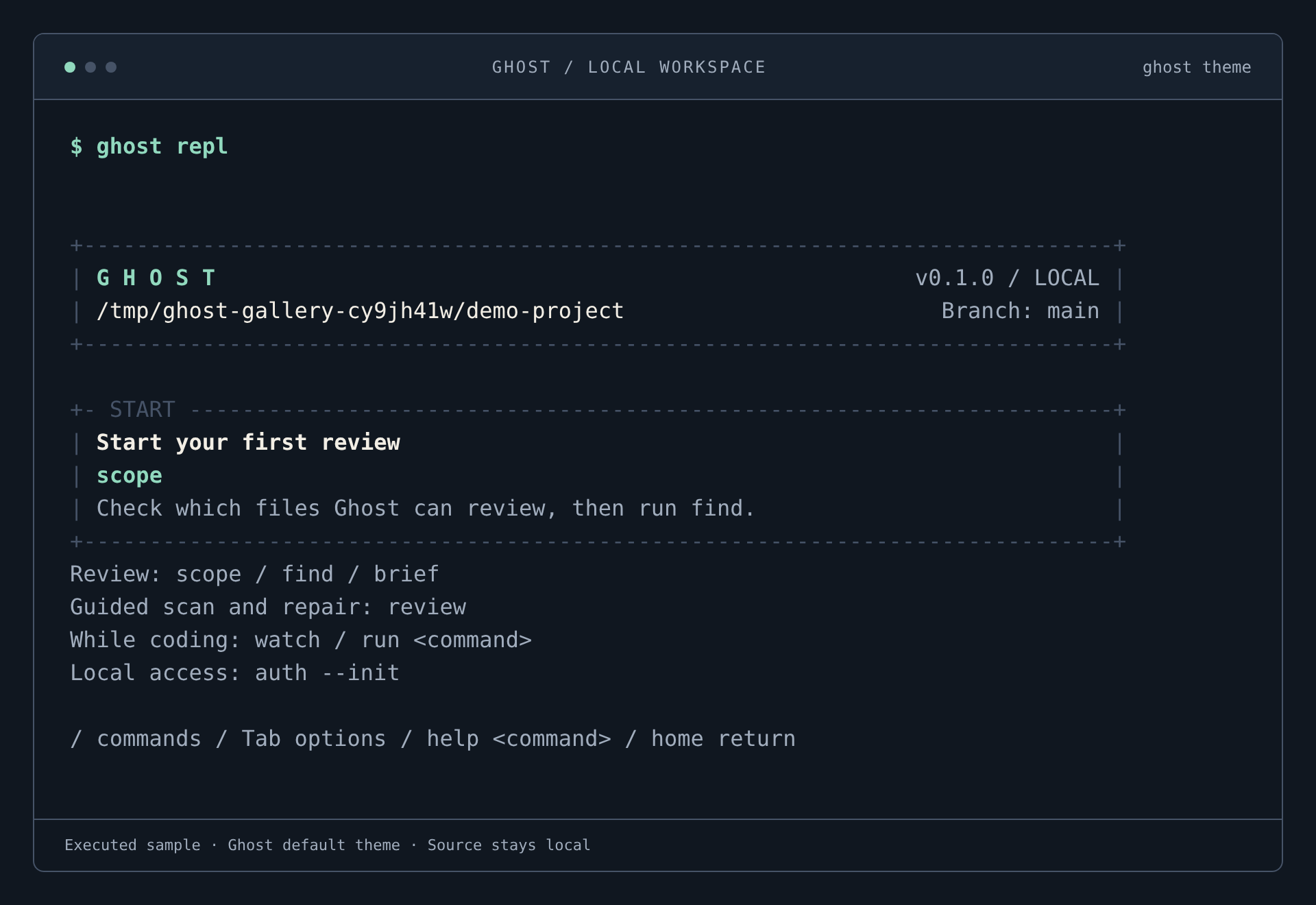
Prefer an interactive workspace? Run ghost repl. Type / to browse commands, guide to choose a workflow, or help for command help. Type -- after a local command to browse its options; Enter inserts a selection, and another Enter runs it.
ghost scope
ghost find
ghost brief
ghost findings- Scope. See selected files, exclusions, and unsupported languages.
- Find. Run Python and bundled JavaScript/TypeScript static checks and save the review.
- Brief. Read priorities, scan status, and next steps from that saved snapshot.
- Findings. Inspect locations, rule IDs, and evidence. Use
ghost findings --id <id>for one candidate.
For a guided scan and repair conversation, use ghost review. It asks about LLM assistance and repair approval. To try a disposable sample first, use ghost demo --security; its approved repair applies only to the generated sample.
Run ghost freshness after edits, or add --audit <id> --json to inspect an older review. Ghost distinguishes changed, missing, unreadable, and unsafe files and flags supported paths absent from that snapshot. This check preserves saved findings and runs no scanner. Use ghost find for current review evidence.
Follow reviews as your code changes
ghost audits --limit 5 --offset 5
ghost compare --change new --severity HIGH --confidence HIGH
ghost compare --change repeated --group-by file --limit 5
Run ghost find again after an edit, then compare the saved reports. Add --offset 5 to reach the next five matching rows or groups. Repeated locations show whether their saved source changed; both review contexts, full totals, and coverage warnings remain visible across filters. A candidate disappearing from a report does not verify a fix.
The optional ghost triage demo uses local FalkorDB queries to rank synthetic findings through service exposure and incident relationships, then shows the package, service, and ownership paths behind the recommendation. Existing scan and repair evidence stays separate. See the FalkorDB setup and submission guide for the runnable demo, schema, and new event work.
Static candidates remain suspected. A saved brief does not recheck current source. Rerun ghost find after edits. Exit code 0 means completed scoped checks without reported findings; 1 means findings or configured access failures need review; 2 means incomplete or blocked checks.
04 / ASK GHOST
Ordinary prompts. Useful actions.
Start a conversation without the REPL watcher, or give Ghost a one-shot local request. Explicit scan and read requests need no model connection.
ghost chat
ghost chat "scan this project"
ghost ask "show my findings"
For less direct requests, connect an AI provider. Codex uses your installed CLI login. Other options include Claude Code, Claude, OpenAI, OpenRouter, Ollama, and compatible APIs; see ghost connect --help.
ghost connect codex
ghost connect codex --check
AI chat sends your prompt and conversation to the configured provider; it does not automatically share source or logs. A model can propose a bounded Ghost workflow. In an ongoing chat, say “do that for me” to run it or “cancel” to discard it. Offers expire after five minutes and are not saved across processes. A one-shot offer prints a Ghost command you can run explicitly. Model-written shell commands and flags are never executed.
Request a tested change
ghost fix "your requested change"Ghost asks you to select one application file and an explicit test command, consent to sharing the selected source with your LLM, inspect the diff and test evidence, then approve application. Answering no keeps your source unchanged.
ghost fix "Accept JSON without evaluating expressions" \
  --path parser.cjs --tests "node --test test/parser.test.cjs" --llm
--llm opts into source sharing. In an interactive terminal, Ghost asks before applying; without interactive input, it saves the tested proposal. --apply is explicit application approval and only takes effect after all gates pass.
A passing suite and static rescan do not prove the requested behavior or security. Choose tests that exercise the changed behavior and review the diff. Fix currently changes one existing file; creating files, editing tests, and repairing a failing baseline suite are unsupported.
For model advice with saved metadata, use ghost ask --context "Explain my latest review" or ghost ask --finding <id> "Explain this risk". These modes are advisory-only. --advice-only also disables chat actions.
05 / KNOW THE BOUNDARIES
What is supported?
| Workflow | Support | Evidence & limits |
|---|---|---|
| Static review | Python, JavaScript, TypeScript | Bandit and four bundled JS/TS rules. Candidates remain suspected. |
| Deterministic repair | Bounded Python literal-parser recipe | ghost solve <id> --tests COMMAND; helper-level security probe plus project tests. |
| LLM Python proposal | Python .py with pytest or unittest | Explicit command; complete passing baseline and patched results; compares passing counts. |
| LLM JavaScript proposal | Plain .js, .mjs, .cjs with Node 20.10+ | node --test <one JS test file>; flat unique tests with matching ordered identities and counts. |
| Other repair runners | TypeScript, JSX/TSX, Jest, Vitest, npm scripts: unsupported | Blocked before requesting a patch. A passing Python suite cannot validate a JavaScript or TypeScript repair. |
Verification rejects zero-test, incomplete, timed-out, failed, skipped, cancelled, TODO, or detectably reduced test runs. Source freshness, snapshot integrity, OS confinement, and static rescans must pass. No runner installs packages or enables network access for verification.
06 / SEE IT IN THE TERMINAL
The workflow, on screen.
Six fresh views from the current Ghost CLI. One theme, one terminal frame, and real sample output. Choose a step below; scroll within a capture or open it at full resolution.
Start in your own repository.
ghost replThe REPL workspace groups the project, branch, and next local review step. The interactive footer explains commands and options as you type. Watching starts only when you request it.
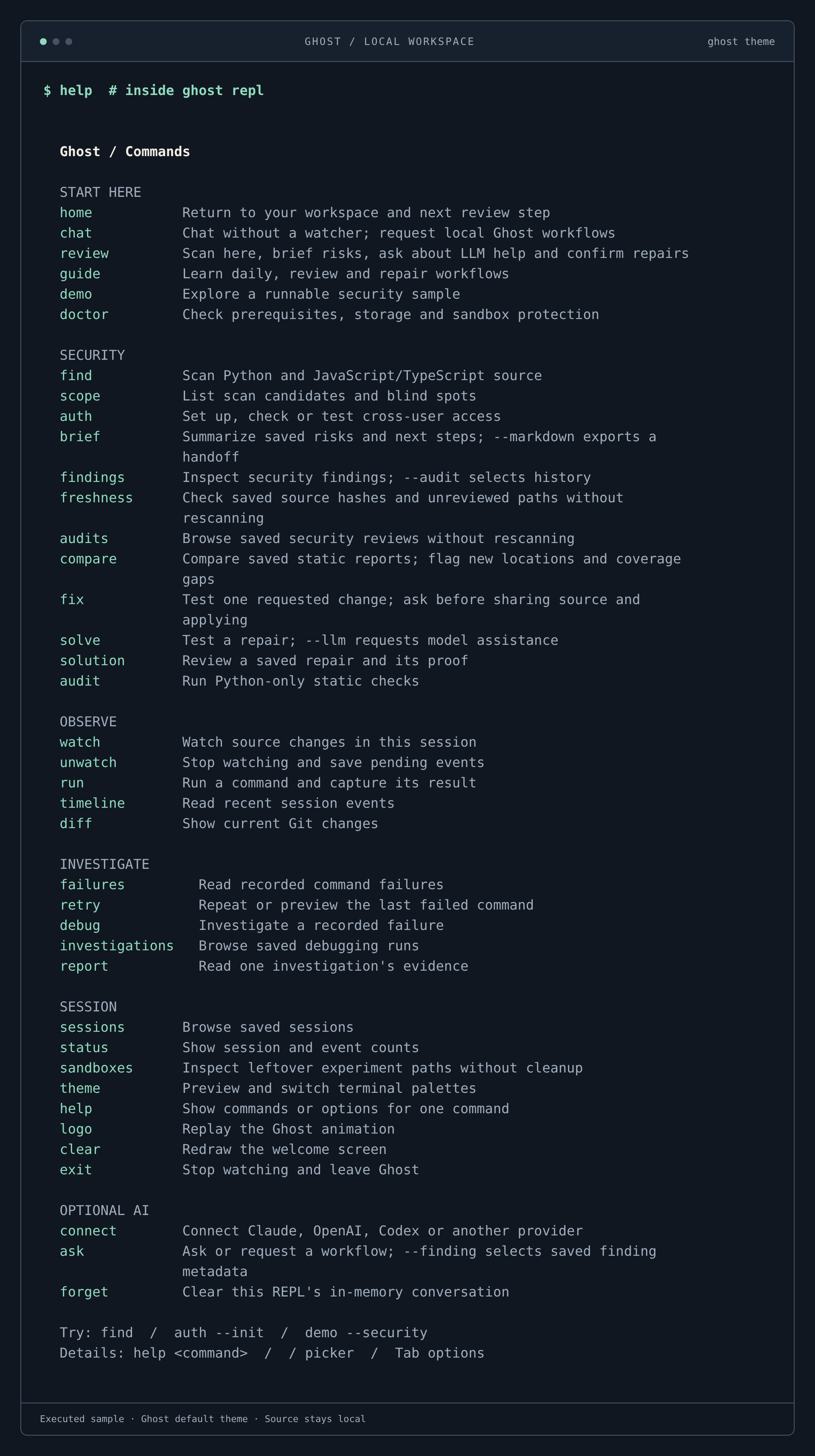
Find the command you need.
help · inside ghost replThe REPL’s current help groups commands by purpose: start, security, observation, investigation, and optional AI.
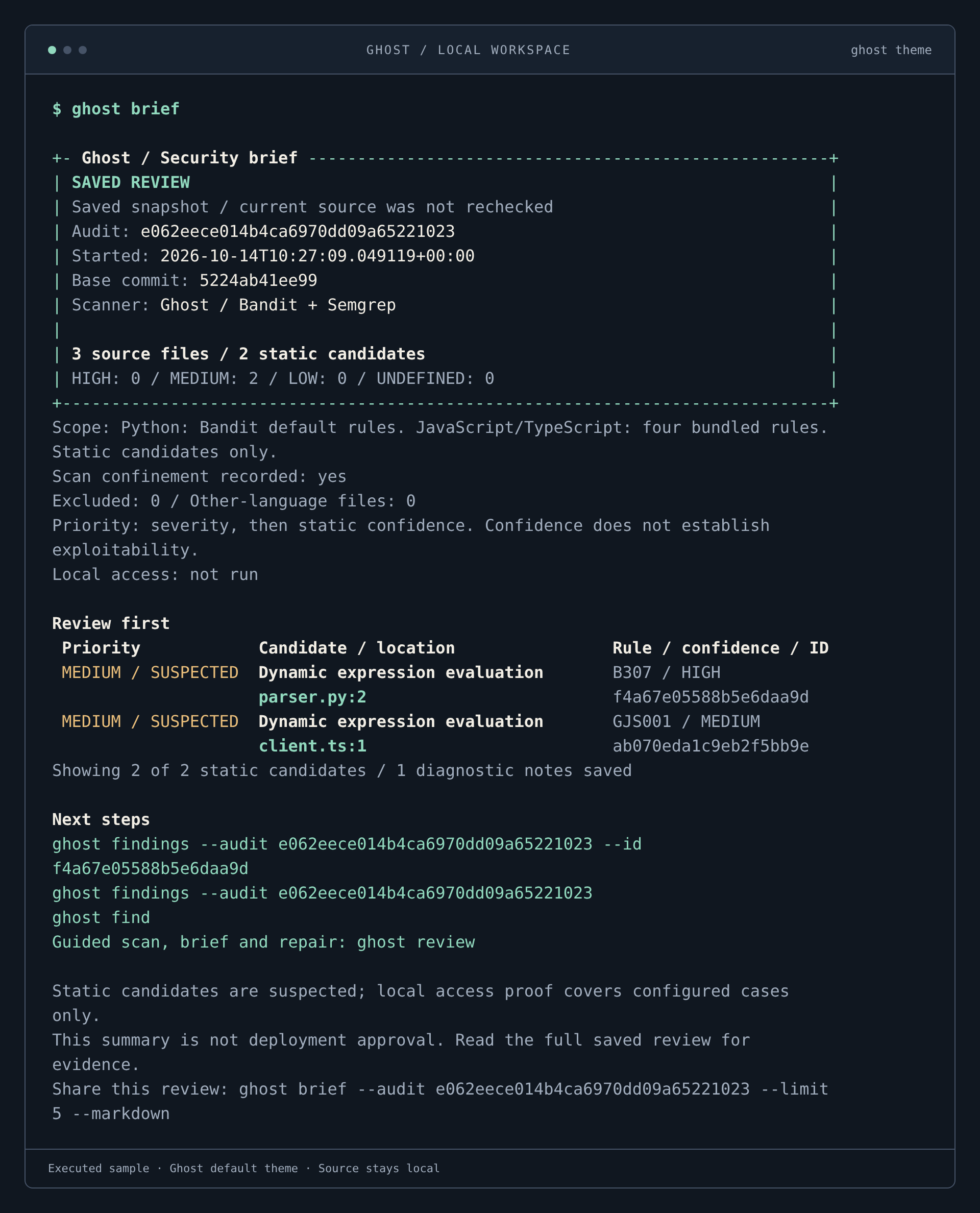
Read the evidence before acting.
ghost briefA saved brief from a real two-language sample scan. Both evaluation patterns are suspected leads; local access and application exploitability were not tested.
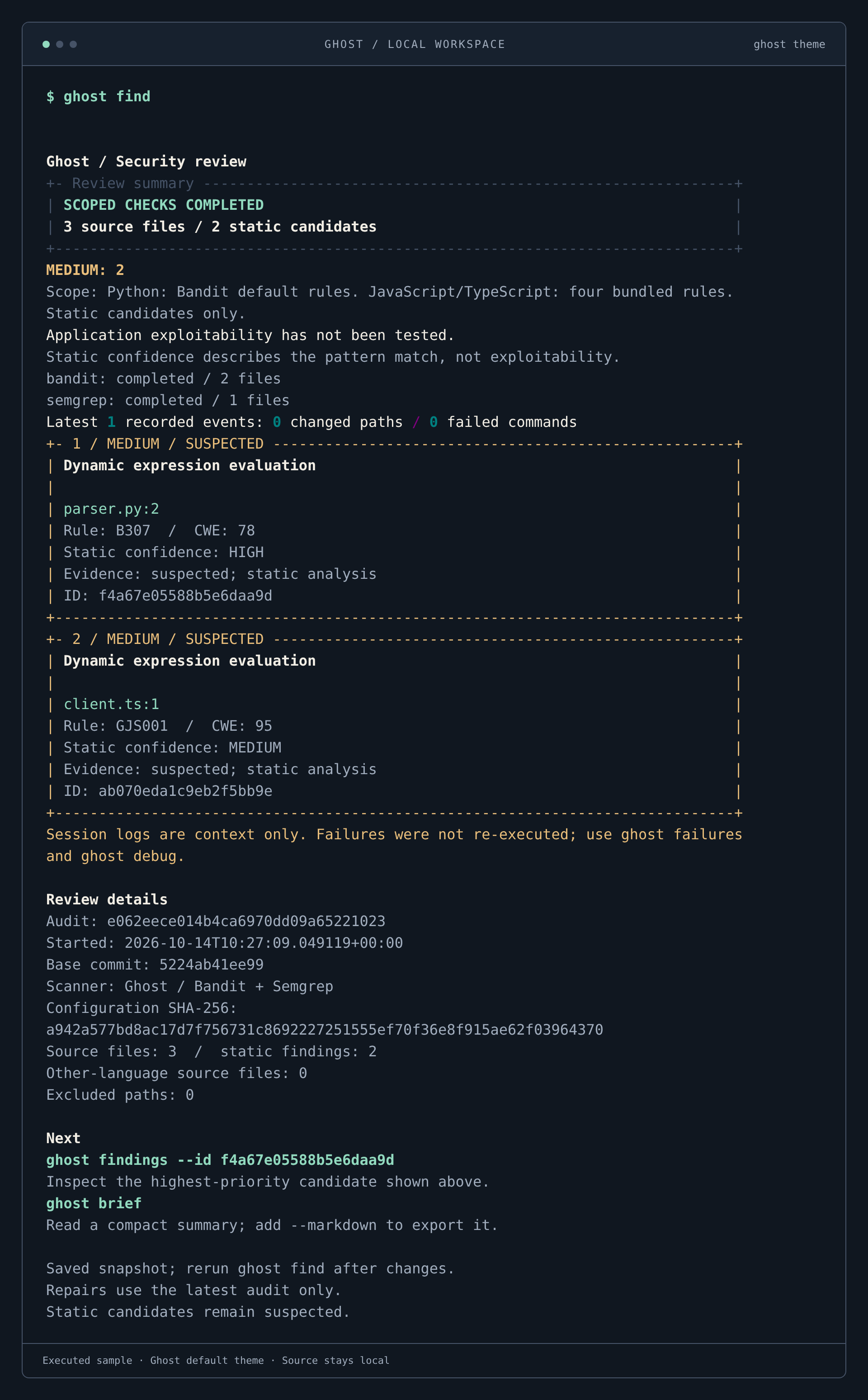
Keep the finding and its scope together.
ghost findBandit and Ghost’s bundled Semgrep rules executed against a disposable Python and TypeScript sample. Read coverage and evidence alongside the candidates.
A repair you can inspect before applying.
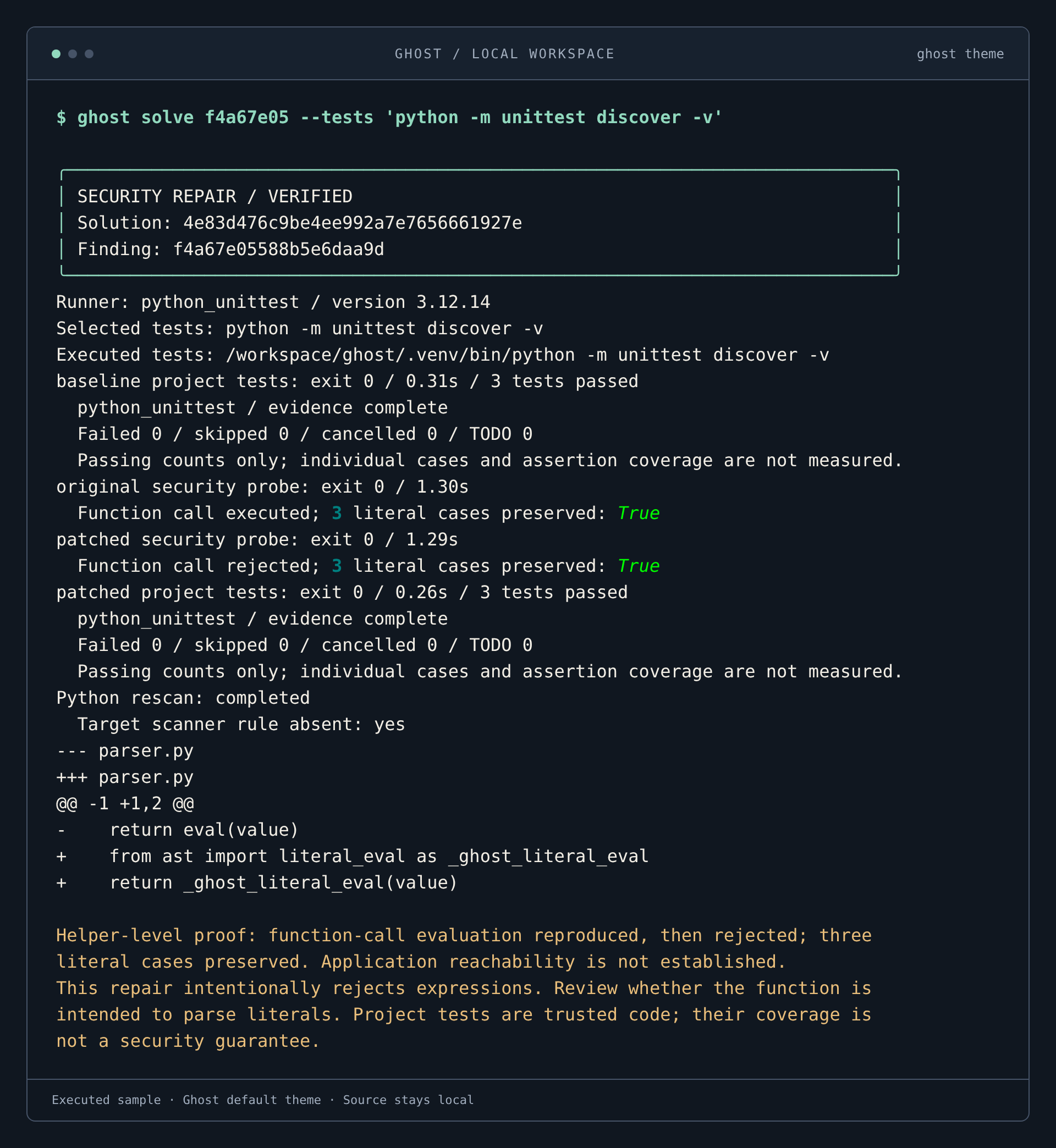
ghost solve <id> --tests 'python -m unittest discover -v'The sample’s Python recipe reproduced function-call evaluation, rejected it after the patch, preserved three literal cases, and passed three project tests. The proposal was not applied; application reachability remains unproven.
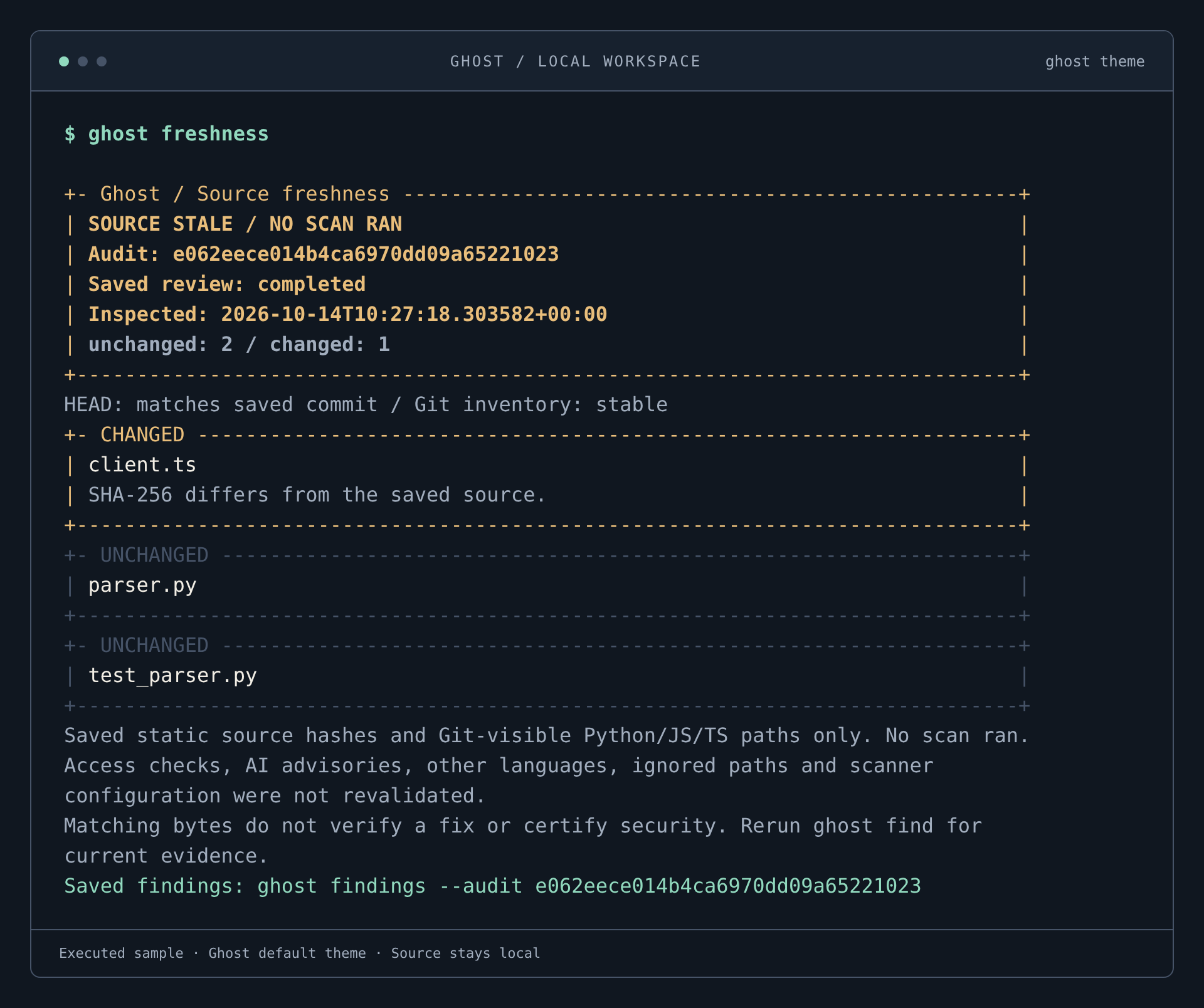
Know when the reviewed source changed.
ghost freshnessAn edit to the sample’s TypeScript parser makes the saved source stale. Ghost compares recorded hashes without rerunning scanners or changing the saved findings.
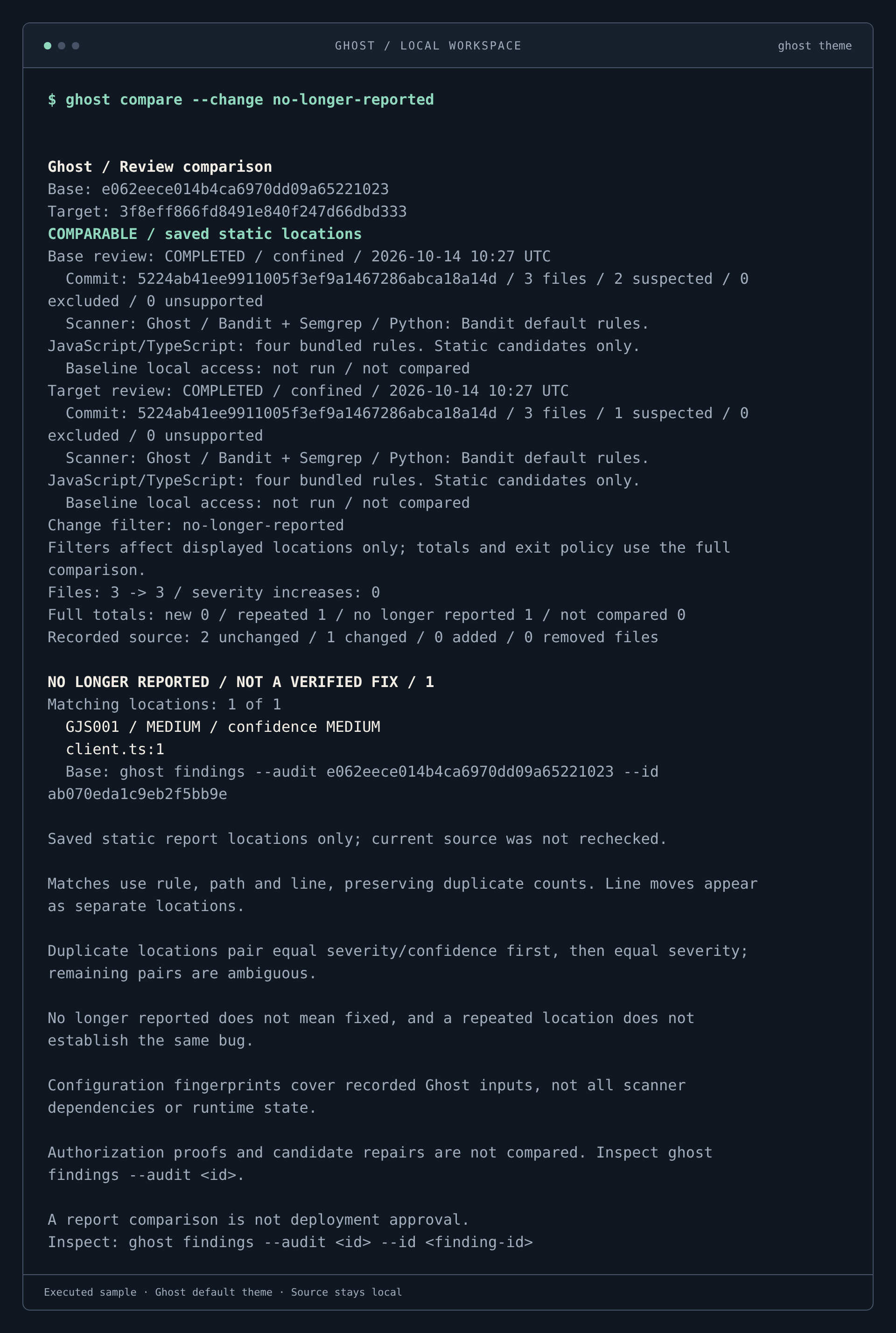
Follow the change through a fresh review.
ghost compare --change no-longer-reportedA real rescan no longer reports the sample’s TypeScript evaluation candidate. The comparison keeps both review contexts, full totals, and changed-source information visible. A disappearance is not a verified fix.
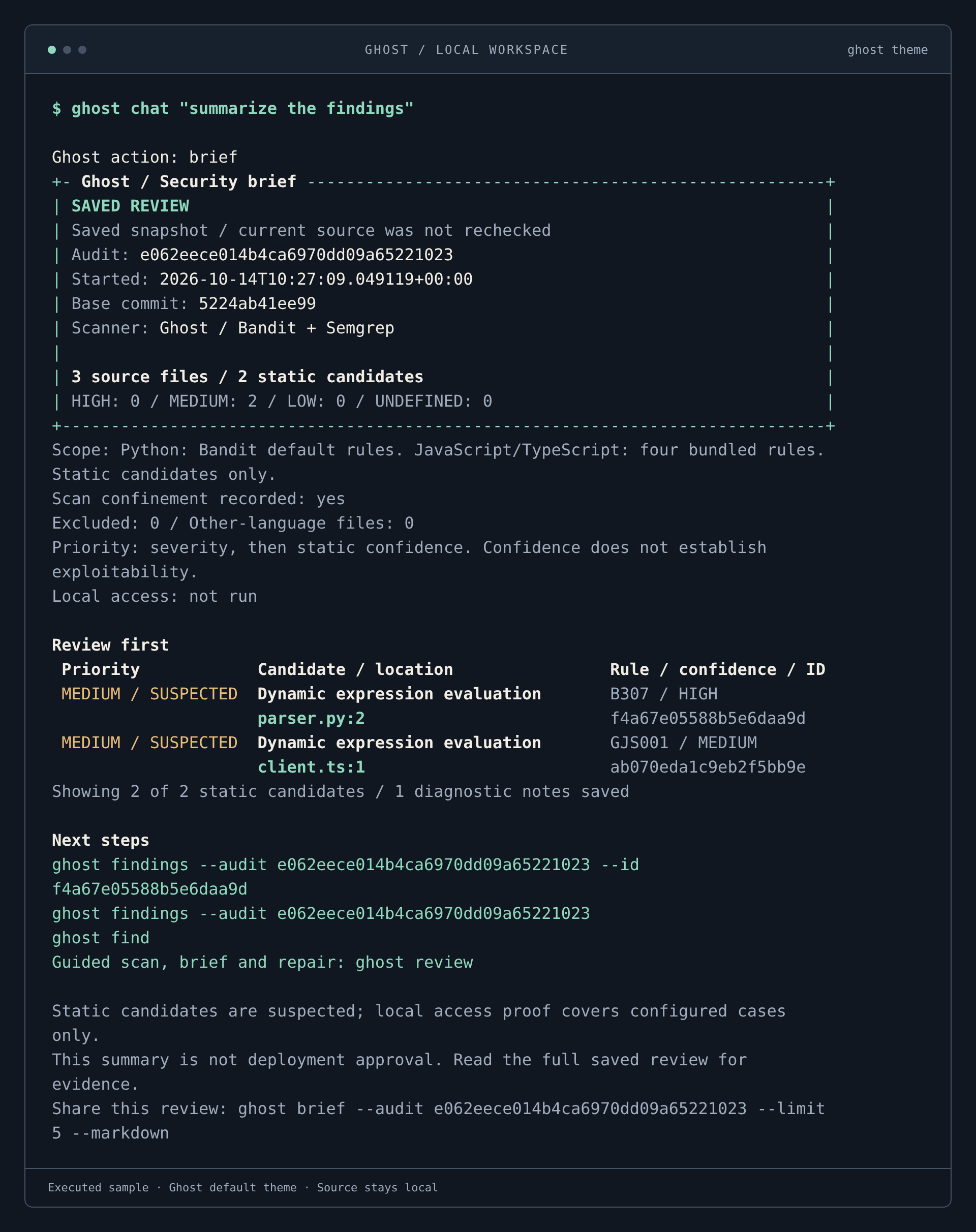
Plain language. A local action.
ghost chat "summarize the findings"Ghost routed this explicit request to the real saved-brief workflow. No model connection or model-generated results were used.
07 / KEEP IT CURRENT
Update or remove Ghost.
uv tool install --force --reinstall --refresh --python 3.12 "git+https://github.com/Devesh36/ghost.git@main"brew update
brew upgrade --fetch-HEAD devesh36/ghost/ghostRemove the installation with uv tool uninstall ghost-debugger or brew uninstall devesh36/ghost/ghost, depending on how you installed it. Uninstalling leaves each project’s .ghost/ history in place.
08 / GET UNBLOCKED
Common setup questions.
“ghost: command not found”
For uv, run uv tool update-shell, open a new terminal, and try ghost --help. uv tool dir --bin shows the executable directory; you can run Ghost from that full path.
“No Git repository” or missing HEAD
Change into the project directory and check git rev-parse --show-toplevel. Ghost needs an initial commit. Create one deliberately using your normal Git workflow; Ghost does not create it for you.
Homebrew appears paused on an older Intel Mac
Homebrew may be updating itself, waiting for installation confirmation, or building dependencies from source. Review its output and progress. If you prefer uv, use the explicit uv instructions above and check your Git and sandbox prerequisites.
Confinement or Node is missing
Run ghost doctor. Linux needs Bubblewrap; macOS needs sandbox-exec. JavaScript proposals need Node 20.10+ on PATH. Install the missing runtime yourself and retry. Keep confinement enabled; disabling it does not qualify a repair.
Tests cannot import my Python project or dependencies
Install Ghost in your project’s Python environment, including its test dependencies. Ghost does not silently install packages. Use explicit pytest/unittest commands; a global tool environment does not inherit the project’s virtual environment.
A proposal is blocked, or the finding is stale
Inspect the reported gate in ghost solution. Rerun ghost find after source changes. Select a supported runner and tests that pass at baseline, include real cases, and do not mutate project files. Ghost does not apply a blocked proposal.
Need more detail? Read the technical guides or open an issue.